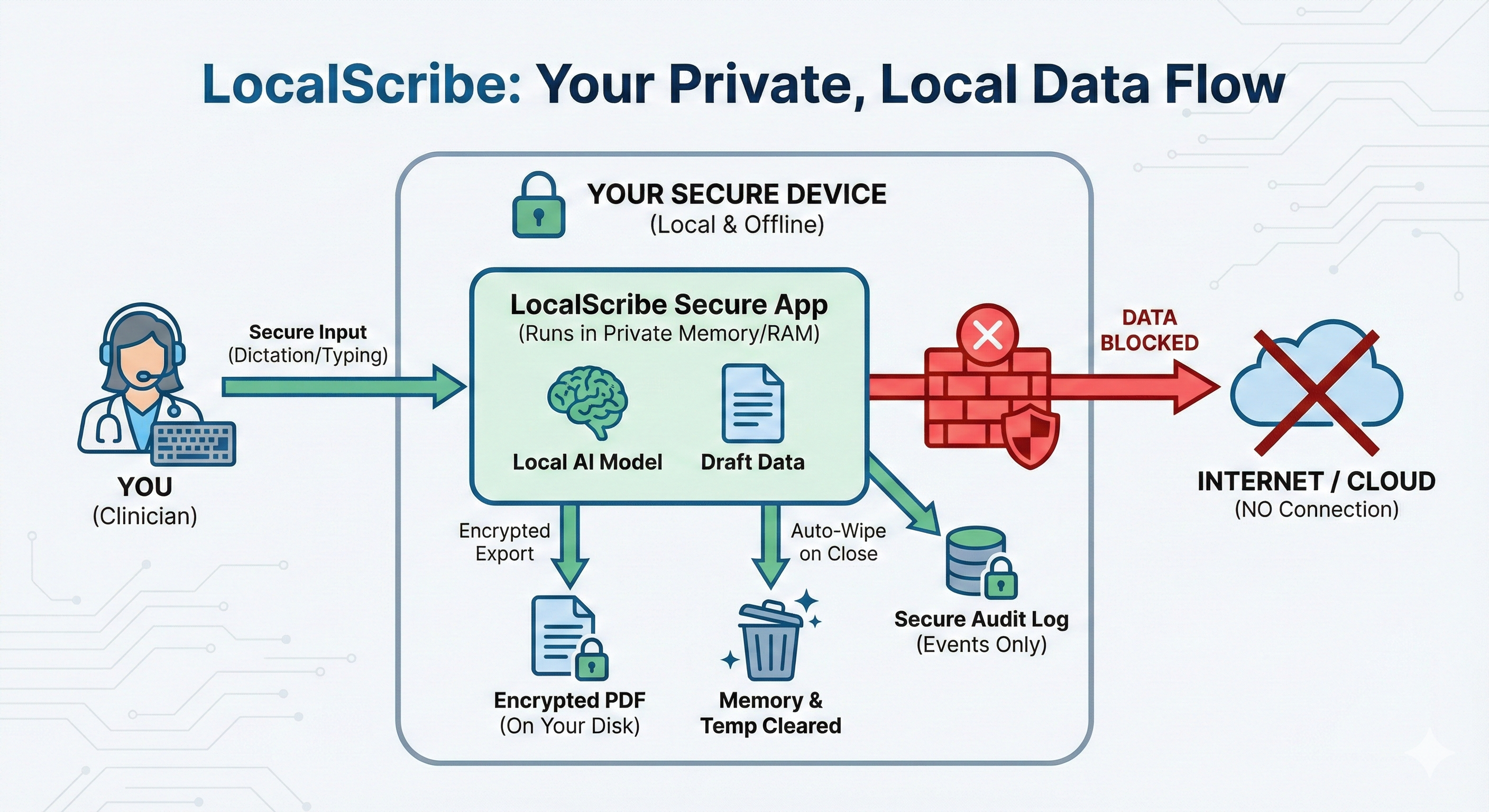
Private by Design
No data sent to servers
AI-assisted clinical documentation
No data sent to servers
Notes in seconds
Reports in minutes
Built for clinical privacy
No monthly subscription
Fight w/ partner this weekend. Slept 4 hrs. Tearful at start. Ambivalent about boundary-setting call tonight. Practiced grounding. Identified all-or-nothing thinking. Boundary-setting call tonight. Denies SI/HI.
Referral for attn/executive functioning concerns. Teacher reports weak task initiation, incomplete independent work, and need for repeated prompts. Obs: quiet at start, needed 2 prompts to begin independent work, off-task during transition, re-engaged once task demands were clarified. Concern is that attn + working memory are affecting independent classroom productivity. BRIEF-2 Teacher Working Memory T=68.
Intake. Client seeking therapy for panic episodes, insomnia, and work stress after role change 3 mos ago. Reports chest tightness, racing thoughts, avoidance of driving on highway, and calling out from work twice this month. PHQ-9 13, GAD-7 15. No SI/HI. Lives with partner, good support. Prior therapy in college.
Today 5/1/26. Tx plan dates 5/1/26-8/1/26. Dx GAD w panic + adj d/o anxious mood after promotion. panic 3-4x/wk. avoids highway driving. poor sleep 4-5 hrs many nights. called out from work 2x this month. CBT model reviewed: trigger = commute / boss email / chest tightness, thought = "I'm going to lose control". wants weekly x12 wks. coping already started: paced breathing, grounding. goals = fewer panic sx, drive highway again, challenge catastrophic thoughts, improve sleep/work attendance.
Free trial included • No credit card required
Drafting & Templates
Feature focus
Progress notes: SOAP, DAP, BIRP, Intervention-Response, and Simple Note. LocalScribe can take shorthand, partial documentation, or fuller clinical text and turn it into structured notes in seconds.
Feature focus
LocalScribe supports intake reports, treatment plans, termination summaries, session summaries, professional letters, referral letters, psychological evaluations, neuropsychological evaluations, school psychological reports, and test interpretation.
Feature focus
Build your own templates with custom sections, prompts, and documentation logic so LocalScribe supports your process instead of forcing a new one.
Inputs & Workflow
Feature focus
Type in shorthand or paste notes from any legacy editor. LocalScribe works with your text and expands abbreviations into structured documents in seconds.
Feature focus
Speak your notes in real-time for fast capture, or record your entire session for fuller draft context. Your voice never leaves your machine.
Feature focus
Use the Draft Queue when you have several notes or reports to get through. Queue multiple generations in succession and let LocalScribe work through them in order, which is especially helpful on slower computers or during back-to-back sessions.
Editing & Output
Feature focus
Use built-in clinical writing styles or fully custom writing instructions to dial in your voice during the trial window and after purchase.
Feature focus
Use the Refine button to provide any custom instruction and instantly update your note. You can process your text to be shorter, longer, more focused, or converted into a follow-up document from the draft you already have.
Feature focus
Attach DOCX, PDF, XLSX, TXT, and audio files that LocalScribe can use as drafting context. For most EHR workflows, copy and paste stays the fastest option. When you do need a file export, LocalScribe exports encrypted PDFs.
Libraries & Control
Feature focus
Save your terms, meanings, and preferred wording. Start with a specialty starter pack if you want, then make it your own and see exactly what the AI will use.
Feature focus
Built for report-heavy testing workflows with included tests, subtests, score types, and interpretation support. Add your own measures and keep reports closer to the batteries you already use.
Feature focus
Local-first design means drafting, transcription, and attachment processing run on your device instead of a remote server. The app also includes secure exports, troubleshooting tools, and model controls.
Mental health and allied health clinicians share the same documentation burden. LocalScribe adapts to your specialty, not the other way around.
Start with ready-made specialty terms, then make them your own. You can use starter packs for areas like music therapy, physical therapy, school psychology, and more.
Build structured frameworks for your discipline: functional goal SOAP notes, ADL evaluation formats, session plans, or specialized assessment structures. Your templates, your clinical logic.
Drafting stays local instead of routing clinical content to a remote AI service.
Use LocalScribe without internet once the app and model are installed.
Encrypted logs, auto-lock, biometric access, and timestamped audit trails.
We never receive, store, or process your PHI.
Generate a personalized risk-analysis report: Create on-device documentation for HIPAA review, business records, or annual risk-review files.
Download a sample Privacy Integrity Report (PDF)These timing examples are meant to set expectations, not promise exact results. Performance depends on your hardware, available memory, and other open apps.
Daily notes, letters, and reports across faster and lighter systems.
| Document Type | Fast (Mac / Windows GPU) | Windows (CPU only) | Older (CPU only) |
|---|---|---|---|
| Daily SOAP Note |
Typical: ~20-80 sec
|
Typical: ~30 sec - 2.5 min
|
Typical: ~1-3.5 min
|
| Clinical Letter |
Typical: ~30 sec - 2.5 min
|
Typical: ~1-5 min
|
Typical: ~2-8 min
|
| Complex Report / Eval |
Typical: ~1-6.5 min
|
Typical: ~2-14 min
|
Typical: ~4-24 min
|
*Times vary by length of recording or shorthand input.
More available RAM and a stronger CPU or GPU generally improve drafting speed, especially for longer reports.
Launch pricing is active while LocalScribe is still early in its public release.
Individual License
$79
Launch pricing
Best for solo clinicians who need one LocalScribe license.
Supports up to two devices for one clinician.
Group License
$59 per license
Launch pricing
For teams purchasing 3 to 10 licenses together.
Each license can be used by one person on up to two devices.
Need more than 10 licenses? Contact Us.
All LocalScribe features are included with every license. Use the list below to see the full product at a glance.
No account required • No internet required after setup
Performance also depends on available memory and other open apps.
Windows and macOS minimum and recommended specs.
Officially supported on macOS 12+ (Monterey and newer).
Officially supported on Windows 10 (22H2)+ and Windows 11.
Download and start using LocalScribe immediately. No account required. Trial includes 50 Create New Draft generations so you can test real note-writing workflows, templates, and instructions. Refine and Regenerate are free and do not count. When ready, purchase a license to unlock full access.
See the System Requirements section for OS-specific minimum and recommended specs. In general, LocalScribe can run on 8 GB RAM systems, 12 GB+ is a better everyday target, and 16 GB+ is ideal for longer report workflows. GPU is optional and improves speed.
Drafting speed is measured in Tokens Per Second (tok/s), where one token is roughly 3/4 of a word. A modern Mac or Windows PC with a dedicated GPU drafts very quickly (35-75 tok/s). A standard CPU-only laptop runs slower (7-25 tok/s), taking a few minutes per draft. Complex reports will always take longer than daily progress notes.
You can download the app first and try LocalScribe before paying. When you are ready, buy the license with a one-time purchase, then copy the license key that is emailed to you and paste it into the app to activate it.
Each license is for one clinician and can be used on up to two devices.
Yes. LocalScribe has built-in license deactivation, so moving to a new computer is straightforward. On your current machine, click Deactivate, then activate on the new machine using your license key.
If you need to look up your key, the link to your Lemon Squeezy account is available right in the app. You can also copy and paste your license key directly into LocalScribe on the new machine.
Group licenses are managed through the purchaser's Lemon Squeezy account. Whoever bought the group licenses can access them there and transfer or deactivate seats as needed.
Install the app, open it, and create your username. Then open Settings in the left navigation, click Models, and download a writing model that fits your computer. You can try different models during the free trial. Once one is downloaded and selected, go back to the main screen, enter a few notes, choose a template, and click Create New Draft for your first generation.
If you want voice features, open the Settings modal and go to Dictation. Set the Dictation Model for live dictation. If you plan to use Session Recording or Audio Attachments, choose the model for those there too.
No. All AI inference happens locally. Audio, text, and generated notes stay on your machine. You control what you copy, export, or share.
LocalScribe is built with a local-first design so drafting, transcription, and attachment processing run on your device instead of a remote server. The only reusable content the app keeps locally is what you intentionally save for later, such as custom templates, custom terminology, and writing styles. Session materials are designed to clear when you close the note or app.
LocalScribe stores only your saved setup locally on your device, including things like custom templates, custom terminology, writing styles, and app settings. It does not store your clinical input or generated output, and it does not use any of that data to train AI models.
I’m a graduate clinical psychology student and board-certified music therapist. I built LocalScribe to show that clinicians can build their own tools with AI, as long as they are informed, competent, and ethical. The blog extends that same mission to educate, to empower, and to make the case through a real product that clinician-built software is possible.